
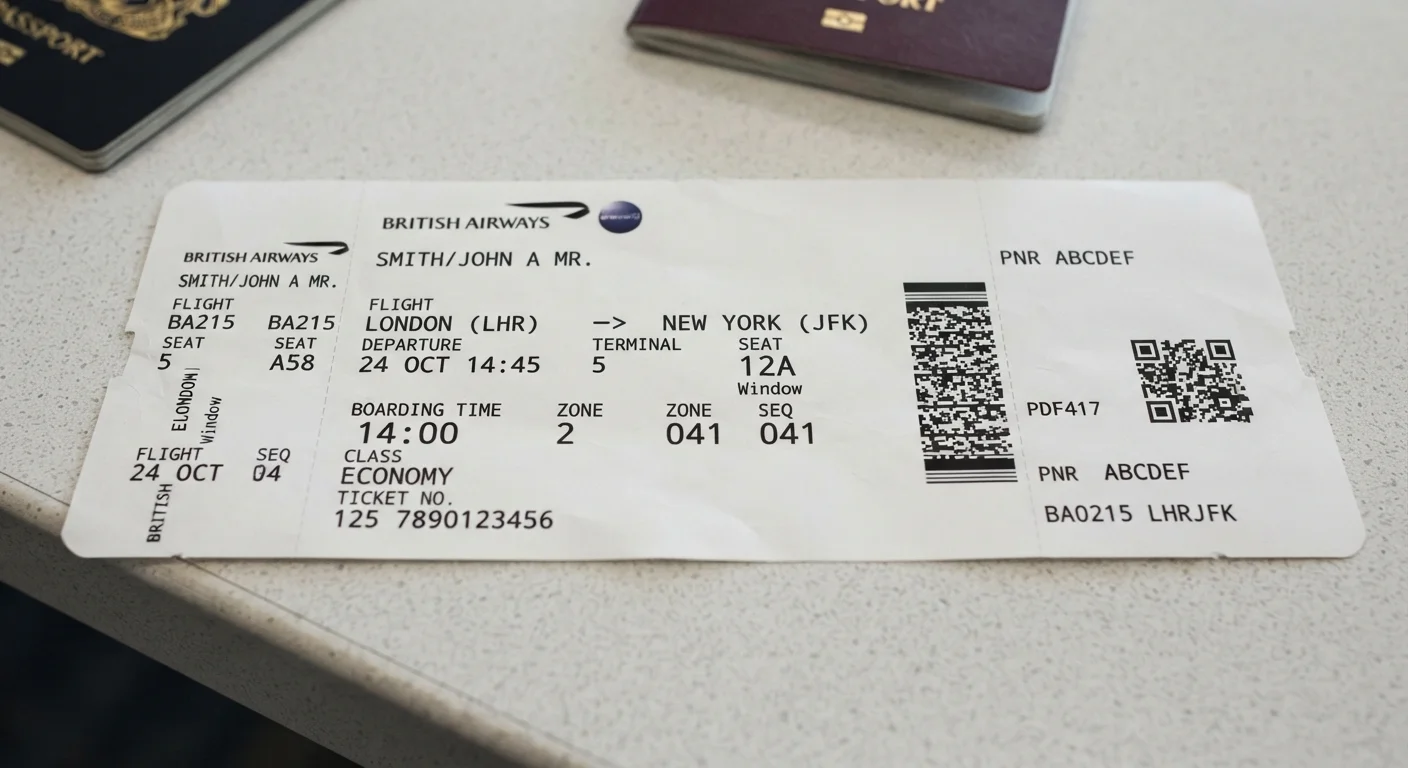
What's Actually Printed on Your Boarding Pass
A boarding pass is more than a ticket to walk through a gate. It's a compressed data sheet containing your flight details, fare class, baggage entitlements, and security clearance status — all encoded in a surprisingly small space. Understanding each field helps you move through the airport more confidently and catch errors before they become problems.
| Standard barcode format | 2D Aztec or QR code (IATA BCBP standard) (IATA Boarding Pass Implementation Guide) |
| Fields encoded in 2D barcode | Name, flight, seat, booking reference, fare class, security status |
| Cabin class letters | F (first), J/C (business), W (premium economy), Y (economy) |
| Gate information reliability | May change after printing — always check airport departure boards |
| Name format on pass | LASTNAME/FIRSTNAME — must match government ID |
| Departure time meaning | Aircraft pushback time, not boarding start time |
Most boarding passes — whether printed at home, issued at a kiosk, or saved as a mobile wallet pass — follow a standardized layout developed by the International Air Transport Association (IATA). The core fields appear in roughly the same positions across carriers.
Field-by-Field Breakdown
Here's what each common element on your boarding pass actually means:
- Passenger Name
- Printed as LAST/FIRST (sometimes with a middle name or initial). This must match your government-issued ID exactly. A mismatch can flag you at security or the gate.
- Flight Number
- The airline code (two letters or a letter and number) followed by up to four digits — for example,
AA 412. This identifies the specific scheduled service operating your route. - From / To Codes
- Three-letter IATA airport codes (e.g.,
JFK,LAX,ORD). If you have a connection, each boarding pass covers one flight segment, not the full itinerary. - Date and Departure Time
- The date is often shown in day-month format and the time is local to the departure city. Departure time refers to when the aircraft pushes back — not when boarding begins.
- Gate
- The gate shown at print time can change. Always verify the current gate on airport departure boards after you clear security. See our guide to boarding sequences and gate-close times for what to do if your gate changes late.
- Seat
- Row number plus letter — for example,
14C. If it readsSEE AGENT, your seat wasn't assigned at check-in and you'll be placed at the gate. For a full breakdown of seat positions, see our comparison of aisle, middle, and window seats. - Class / Cabin
- Shown as a single letter:
F(first),JorC(business),W(premium economy), orY(economy). This reflects your actual cabin, not just the ticket price tier. - Fare Basis Code
- A short alphanumeric string (e.g.,
YLOWUS) that encodes the fare rules — changeability, refundability, and upgrade eligibility. Useful if you need to rebook or dispute a fee. - Boarding Group or Zone
- Determines when you're invited to board. Lower numbers or earlier letters board first. Priority zones are typically reserved for elite-status passengers, premium cabin travelers, and those needing extra time.
- Sequence Number
- The order in which you checked in within your boarding group. A low sequence number (e.g.,
003) means you checked in early; it's used by gate agents for standby and upgrade processing.
IATA Airport Code
A three-letter code assigned by the International Air Transport Association to identify airports worldwide. For example, JFK represents John F. Kennedy International Airport in New York.
Fare Basis Code
An alphanumeric string encoding the rules attached to a specific ticket, including restrictions on changes, refunds, and upgrades. It's set at the time of booking and governs what you can and cannot do with that fare.
Boarding Zone / Group
A number or letter assigned by the airline that determines when a passenger may join the boarding line. Zone 1 or Group A passengers board before Zone 4 or Group D passengers.
BCBP Standard
The IATA Bar Coded Boarding Pass standard, which defines what data is encoded in a boarding pass barcode and how it's structured, enabling consistent scanning across all airports and carriers.
Sequence Number
A check-in order number printed on some boarding passes, indicating how early you checked in relative to other passengers. Gate agents use this for standby and upgrade processing.
The Barcode and What It Encodes
Every boarding pass carries either a 1D barcode or a 2D QR/Aztec code. The 2D barcode — standard on most passes today — stores a structured data string defined by the IATA Boarding Pass Implementation Guide (BCBP standard). It encodes your name, flight details, seat, booking reference, fare class, frequent-flyer number (if applicable), and a security flag indicating whether you've passed advanced passenger pre-screening.
Protect Your Boarding Pass Barcode
The 2D barcode on your boarding pass stores personal data including your booking reference and frequent-flyer number. Avoid sharing photos of your boarding pass publicly — someone with a barcode-reader app could access your reservation details. Shred or delete boarding passes once your travel is complete.
Because the barcode contains personal data, avoid posting photos of your boarding pass on social media. Someone with the right app can decode the barcode and access your booking reference, which may give them enough information to view or modify your reservation through an airline's self-service tools.
Once you've completed travel, shred or delete physical and digital boarding passes rather than leaving them accessible.
Common Boarding Pass Errors and What to Do
Errors on boarding passes are rare but do happen. The most common issues include a misspelled name (a single character off is usually fine; a substantially different name requires correction), the wrong date or flight number after a rebooking, or an outdated gate printed before a change. Always compare your boarding pass against your confirmation email before leaving for the airport.
If you spot a name discrepancy, contact the airline directly — either at the check-in counter, by phone, or through the airline's app. Minor typos are typically corrected without a fee; significant name changes may involve reissuing the ticket. For background on what happens once you hand over your bag and pass security, see our article on what happens to your bag after check-in and our plain-language walkthrough of airport security screening.